Chrome extension · included in Pro
The return of every listing, without leaving idealista or Fotocasa.
As you browse, every listing shows its Total Return, its €/m² versus the area and its cash flow, computed with your profile. Open the panel, change the assumptions and watch the number move. No copying links, no switching tabs.
Requires an active Pro subscription, logged in at casaroi.app.
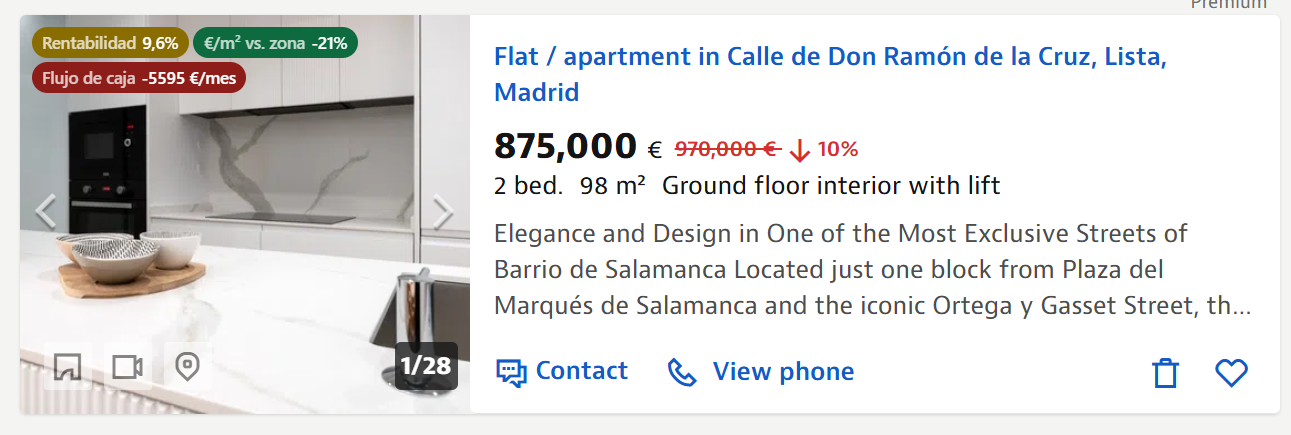
Search results, with every flat's return in plain sight.
How it works
Three things it does while you browse.
01
Badges every listing
In search results, every flat carries its Total Return (IRR), its €/m² versus the area's typical price and its monthly cash flow. Green, amber or red: you know where to look before opening anything.
02
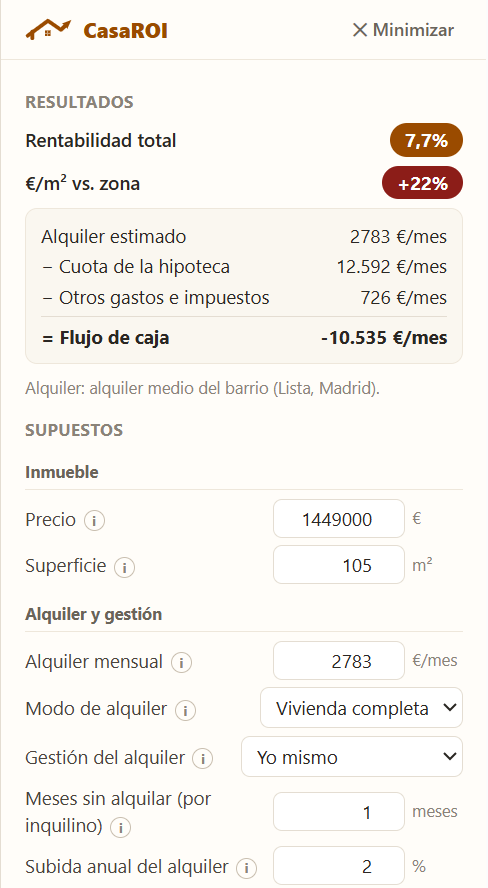
Opens a panel on the listing
On any listing, the CasaROI panel breaks the number down: the neighbourhood's estimated rent, the mortgage payment, costs and taxes, and what's left each month.
03
Adjust and save
Change the mortgage, rent, management, vacancy months or sale horizon and the return recalculates instantly. One click saves it to My flats.
What's behind the numbers
The same calculator as casaroi.app.
Not a quick estimate: the full engine, applied to the listing in front of you.
- Rent anchored to the neighbourhood: SERPAVI cap in stressed zones, adjusted market rent elsewhere
- Regional and municipal taxes: transfer tax (ITP), income tax (IRPF or IRNR), property tax, capital gains
- Real mortgage payment, at your rate and term
- Official historical appreciation for the area, through to the sale
Requirements
Anyone can install it; the numbers only appear with a Pro account logged in at casaroi.app. Works on idealista.com and fotocasa.es, in Chrome.
See plans →Privacy
We don't read your browsing history or ask for the tabs permission. From each listing you open, only the price, size and area are sent to CasaROI, to compute its return.
Extension privacy policy →CasaROI is not affiliated with idealista, Fotocasa or any other portal; their names are mentioned only to indicate compatibility.